
After-Sales Service Management Software
Retail | Logistics | Business | Real Estate | Technical Services
Bob! Desk is a SaaS-based After-Sales Service (SAV) management software. It enables you to streamline communication with all stakeholders (team, service providers, and clients) and simplify the planning and execution of after-sales service interventions. Automate what can be automated and eliminate unnecessary actions.
[embedpress]https://www.loom.com/share/7e7f6c3c1b50445b9eb233b9500e31a7[/embedpress]


Our References
















What you are (probably) looking to achieve with after-sales service intervention management software
Better After-Sales Service Intervention Management
It’s not easy to manage a large volume of interventions.
Being responsive, offering relevant solutions, minimizing costs, etc.
Strong constraints for an activity that never stops, and you’re asked to perform it with a pointed knife.
How about trying the cordless screwdriver?
Data Collection and Centralization
No more emails, Excel, and the like.
Create interfaces to collect your interventions.
All that’s left is to validate and transmit to your service providers.
Stop struggling, start managing. Stop searching, start finding!
Elimination of Duplicate Entries
We need to address this!
Copying the intervention, pasting it into Excel, sending it by email, then updating Excel to finally email the service provider/client…
Madness! Preserve your sanity.
Optimization and Automation
When features in this area are presented, it’s
often a mix of admiration:
– “So easy to set up 😍“
and weariness:
– “So I spend 80% of my time doing useless actions? 😒“.
Let’s schedule a chat!
Better After-Sales Service Intervention Management
It’s not easy to manage a large volume of interventions.
Being responsive, offering relevant solutions, minimizing costs, etc.
Strong constraints for an activity that never stops, and you’re asked to perform it with a pointed knife.
How about trying the cordless screwdriver?
Data Collection and Centralization
No more emails, Excel, and the like.
Create interfaces to collect your interventions.
All that’s left is to validate and transmit to your service providers.
Stop struggling, start managing. Stop searching, start finding!
Elimination of Duplicate Entries
We need to address this!
Copying the intervention, pasting it into Excel, sending it by email, then updating Excel to finally email the service provider/client…
Madness! Preserve your sanity.
Optimization and Automation
When features in this area are presented, it’s often a mix of admiration:
– “So easy to set up 😍
and weariness:
“So I spend 80% of my time doing useless actions? 😒
Let’s schedule a chat!
Main Features
Curative and Intervention
Dashboard
Technicians and Service Providers
Preventive and Regulatory
Equipment and Inventory
Interface by Profile
After-Sales Service Management
with Bob! Desk
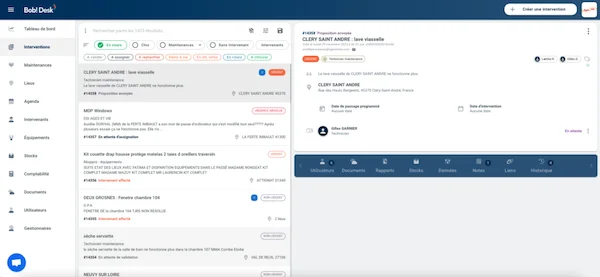
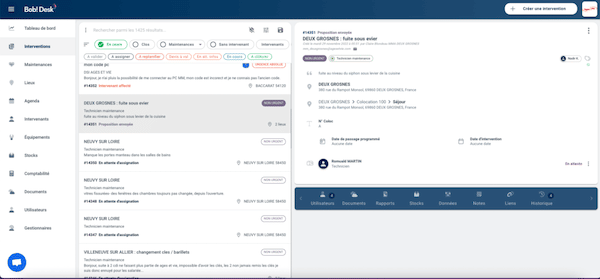
Get an overview of your requests and ongoing interventions
On Bob! Desk, track the progress of your interventions in real-time via your history or your management locations. There’s nothing better than having perspective on a situation to better monitor or analyze it. You gain clarity, and the information is intelligible for all your collaborators who were not involved in the intervention planning.
Modify your intervention requests and inform your network with one click
Add information and documents, change the time or day of the intervention, negotiate the quote: you can do everything directly on Bob! Desk without having to call or email your contact. The different stakeholders will be notified. More fluidity, more efficiency, less wasted time.
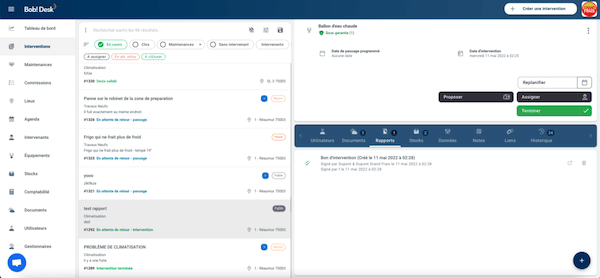
Share all information related to your intervention request
Do you have photos to attach? Suggestions? Instructions to give to your different contacts? Attach all your notes to your intervention ticket. Easy to organize, all your information is listed and accessible to the contacts you have registered on the intervention ticket.
Using Bob! Desk after-sales service intervention management software:
a quick and economical transition
Bob! Desk has completely revolutionized maintenance within our company. Managers have gained autonomy. They have peace of mind and can now be 100% focused on their missions while being sure to have an impeccable store! No more wasting time looking for a craftsman, Bob! takes care of everything in record time. Also, no more chasing invoices; everything is readily available and immediate. With Bob!, we have gained time, efficiency, and quality. Maintenance is still not a pleasure, but we're getting closer with Bob!
Yves MANSOUR
We were looking for a new-generation CMMS solution last year, and Bob! Desk quickly became our choice.
Intuitive, affordable, and last but not least, the service!
The quality of customer service made all the difference: attentiveness + responsiveness to the various issues we encountered during the implementation and use of the solution.
As an SME experiencing strong growth and evolution, having a partner who listens to our challenges was very important.
I therefore highly recommend the Bob! Desk CMMS solution and the Team.
Boris CRIQUET
The Bob Desk! solution is THE solution that best adapts to our needs, from a user-friendly and ease-of-use perspective; all our center directors adopted it from their first login.
It covers all technical aspects of maintenance, whether preventive or corrective, with global views on budgets at any given moment, which allows us to identify deviations or not on our CAPEX.
The same applies to the regulatory control part, where we will also switch 100% to the solution as soon as our contract with our historical provider ends.
I am completely satisfied with the solution.
Carlos FRANCISCO
Frequently Asked Questions
Do you still have questions about our Bob! Desk intervention and maintenance request management tool? Give our technical team a call at 01.84.60.12.50.
What is Bob! Desk?
Bob! Desk is software for managing intervention, maintenance, and troubleshooting requests. It is a CMMS platform that simply centralizes all planning and communication tools among the various stakeholders: you, us, your collaborators, your service providers, our craftsmen, and anyone else you wish!
On which devices can I use Bob! Desk?
Bob! Desk software is available on all devices: PC, Mac, tablet, or smartphone. It requires an internet connection and an up-to-date browser (ideally Chrome).
What are the advantages of using the Bob! Desk request management tool?
By using Bob! Desk, you benefit from a multitude of advantages. Among them:
- A platform that centralizes all your management
- Certified and pre-selected service providers from our Bob! Dépannage network whom you can count on
- Advice and support for your emergencies and technical needs
- A team available for questions: problem identification, pricing grid, recruitment advice...
What commitment is required for a Bob! Desk subscription?
The commitment is 12 months. Annual payment, you have the option to cancel your subscription by email.
How can I contact Bob! Desk support?
You can reach us from 8 AM to 10 PM, 6 days a week: via in-app chat, by phone at 01.84.60.12.50, or by email at [email protected]