
CMMS Software Comparison
The 6 best CMMS software in 2025
Complete guide to solutions by use case
🛠️ What is the best CMMS software?
The one that truly adapts to your business, your teams, and your field challenges.
Choosing the right CMMS (Computerized Maintenance Management System) software is crucial to avoid lost interventions, poorly tracked equipment, or endless schedules. But with the explosion of available solutions, comparing CMMS software has become a real headache (trust us, we know).
Don’t panic. We’ve done the heavy lifting for you.
👉 Follow the guide.
🛠️ The best CMMS software by use case (complete guide below)
Client or service provider, do you manage interventions across one or multiple sites, a country, or internationally?
Bob! Desk – The SaaS platform to manage and digitize your interventions, anywhere in the world
Preferred sectors: retail, restaurants, non-profit, leisure, commercial, hospitality, accommodation, healthcare & multi-domain service providers.
Are you an industrial company looking for a Plug&Play solution?
Mobility Work – A CMMS designed for industry
Preferred sectors: Industrial maintenance, food processing, heavy industry, production, pharmaceutical and healthcare, cosmetics
Are you a service provider, working at client sites, and looking for a solution integrating quotes/invoices and CERFA?
Twimm – The field management solution for service providers
Preferred sectors: HVAC, plumbing & sanitation, electrical, landscaping, cleaning, 3D specialists, moving
Client or service provider, are you looking for a high-performance solution for route management, logistics, or security?
Nomadia – The leader in Smart Mobility solutions
Preferred sectors: Consumer goods, Automotive, Telecommunications, Transport & Logistics, Maintenance & Energy
Institutional, local authorities, administration, industrial, are you looking for a 360° solution in project mode?
Carl Software – The reference CMMS for asset and maintenance management
Preferred sectors: Industrial, Real Estate, Healthcare, Transport, Local Authorities and Administration
Client or service provider, are you looking for a solution dedicated to managing your vehicle fleet?
Fleetnote – The digital fleet management solution
Preferred sectors: Small businesses, SMEs, Large groups, non-profit
📌 Table of Contents
1. Overview of selected CMMS
2. The 8 selection criteria you need to review
3. The main features of a CMMS
4. What are the alternatives?
5. What is the right price for a CMMS?
6. Advantages and disadvantages of free software
7. Conclusion
1. Overview of Selected CMMS
We prioritize the quality of selected solutions over quantity and are pleased to present solutions that are far better than ours in their domains. Our approach is not limited to the popularity of a tool, but to its actual ability to meet concrete business needs—whether you are a service provider, multi-site operator, or industrial equipment manager.
This comparison is updated regularly to incorporate market innovations and highlight newer but promising solutions. Each selected software has been evaluated based on its specialization, ergonomics, deployment speed, and relevance by industry sector.
Bob! Desk, designed for multi-site intervention management

Bob! Desk is a SaaS CMMS solution designed to simplify the management of your internal or external interventions, perfect for retail, restaurants, non-profit, commercial, hospitality, accommodation, healthcare, and multi-domain sectors.
Accessible from a browser, it allows you to manage interventions, tickets, service providers, equipment, and inventory intuitively.Bob! Desk also offers a free 14-day trial, with no credit card required, to freely test its features.
It is therefore an ideal software if you are looking for simplicity, ergonomics, and responsiveness in service and hospitality-oriented sectors.
SaaS mode – International & multi-language – Headquarters in Ile-de-France
Ratings: 5/5 on 24 reviews Google My Business – 4.7/5 GetApp – 4.7 Software Advice
Twimm, the service provider-oriented CMMS with quotes, invoices, and mobility

Twimm, tailored for service providers, is a SaaS CMMS software offering complete workflow management (quotes, orders, invoicing) and field interventions.
It stands out with advanced features such as contract tracking, mobility (offline mode), activity reports, client portal, document management (DMS), and field satisfaction measurement.
Used by approximately 30,000 clients via web and mobile, Twimm positions itself as a reliable solution for multi-service organizations.
Its free offering or starting from €0/month, coupled with an intuitive interface, makes it a relevant choice for service providers who want to manage contracts, interventions, and invoicing while staying mobile.
Ratings: 5/5 on 24 reviews Google My Business – 4.7/5 GetApp – 4.7 Software Advice
Nomadia Field Service, to optimize travel and security
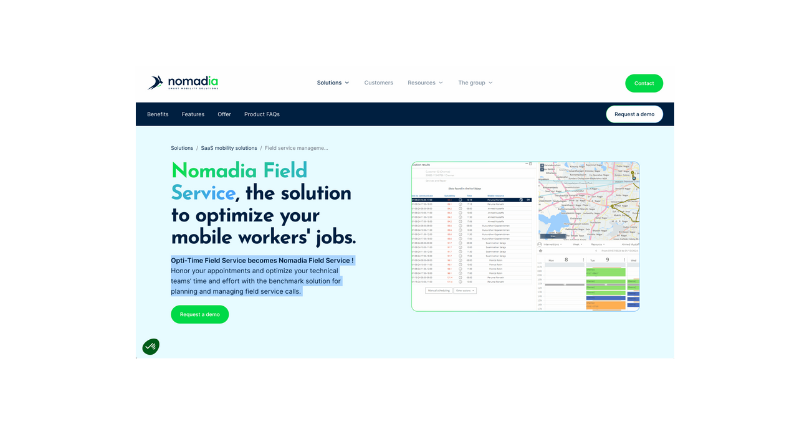
Nomadia Field Service is a CMMS application designed to improve the productivity of mobile technicians and optimize intervention planning. It offers a clear interface, quick to deploy, focused on field needs, with integrated actionable reports.
The Nomadia blog emphasizes that choosing a CMMS should be based on business needs, which its solution prioritizes.
It is the ideal solution if you are a client or service provider and want a simple, mobile, and high-performance CMMS application for your field teams.
Carl Source, the 360° CMMS for institutions and large assets
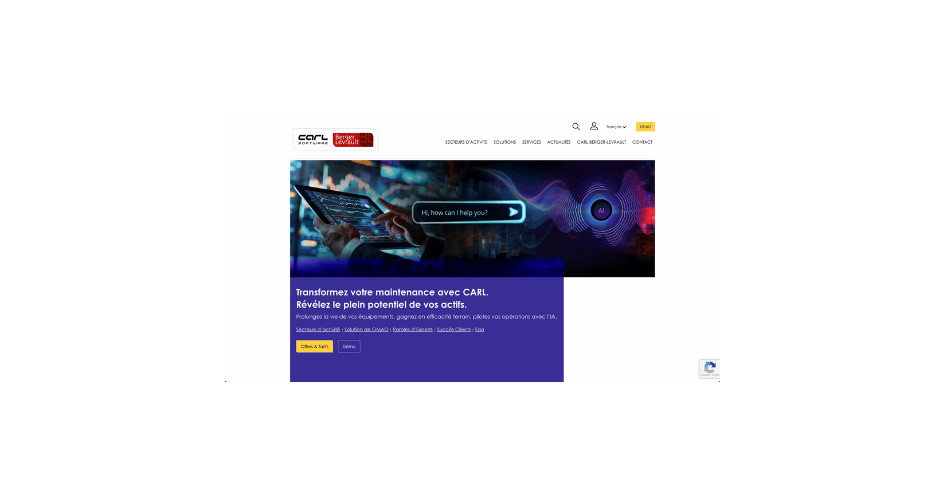
CARL Source (Carl Software / Berger-Levrault) is a mature CMMS/EAM solution, enriched by over 30 to 40 years of experience. It offers advanced features—asset management, maintenance, inventory, costs, interventions, reports, IT integration—in a modern, customizable, and secure internet architecture.
It adapts to many sectors (industrial, real estate, healthcare, transport, local authorities, administrative) and operates in project mode for complete coverage of your needs.
Version 7, introduced in January 2023, brings significant innovations (IoT, BIM, mobility, ergonomics).
It is particularly suited to complex structures (local authorities, institutional, industrial) that need a robust, integrated, and modular solution.
FleetNote, a CMMS dedicated to vehicle fleet management
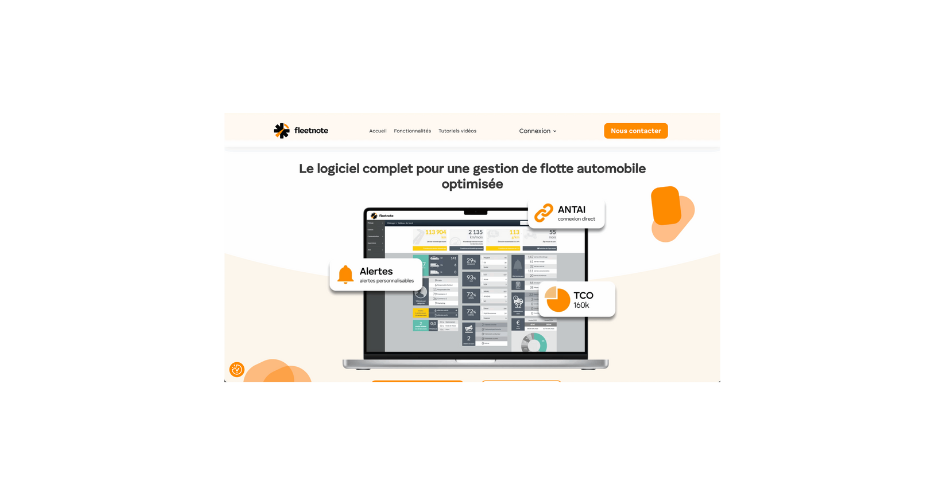
FleetNote is a SaaS software dedicated to vehicle fleet management, developed by and for fleet managers, accessible via web and mobile application.
It centralizes vehicle tracking, contracts, mileage, personalized alerts, TVS, and claims, facilitating optimal fiscal and operational management.
Advanced features such as real-time tracking, GPS integrations, and automatic alerts make FleetNote a proactive solution to reduce costs and improve fleet performance.
Perfect for small businesses, SMEs, large groups, or non-profit organizations seeking intelligent and seamless fleet management.
Discover our selection of the best CMMS software of the year, evaluated based on their features, ease of use, and value for money.
2. The 8 Selection Criteria of the Comparison
Features
This may seem obvious, but keep in mind that what is true for your company is not necessarily true for others. One of the most important characteristics for choosing your CMMS: knowing its features. The software must be adapted to your needs and objectives, and must be intuitive for rapid deployment.
User Experience
Ergonomics in a CMMS software that you will use every day is very important.
If the user experience is not optimized, its use will be discouraging: there will therefore be a significant negative impact on the efficiency of management and maintenance.
Simplicity
The purpose of your future CMMS is to simplify the entire organization of maintenance and therefore all associated procedures. It is therefore important before choosing to know the internal processes well, whether for you or for anyone involved in using this new tool.
Mobility
A CMMS application must also be mobile because it can also be intended for technicians or people in different locations (store manager, warehouse, etc.). It must allow them to have all the information on interventions at their fingertips on a tablet or phone.
Sharing
Real-time data sharing is essential today; for this, cloud solutions are effective, allowing you to centralize all information within a shared environment among multiple users without software installation but simply with a connection to an online tool.
Security
One of the characteristics (and not the least), is the security of your data. Data backup must be a priority in choosing your CMMS and ensure the highest security; you must inquire about the technology used before signing.
Accessibility
Finally, when we talk about characteristics for choosing your CMMS, we often forget that the application must be accessible everywhere and at all times, which is why turning to Cloud technology is often the right answer. An evolving solutionSoftware must evolve regularly and according to the needs of its users.
Customer Service
The support that will be provided to you when needed is essential. Choose a team that is available and with whom you feel valued. ReputationAsk for references from clients similar to your company and read online reviews to get an idea of customer satisfaction with the solution.
3. The Main Features of a CMMS
Intervention Tracking
Requested: always
Complexity: medium
Track maintenance work performed on equipment, including costs, time, and resources required.
Preventive maintenance planning
Requested: always
Complexity: medium
Schedule maintenance tasks based on calendar, operating hours, and predetermined maintenance intervals.
Equipment Tracking
Requested: Often
Complexity: medium
The ability to track equipment information, such as purchase date, maintenance costs, downtime, etc.
Stock Management
Requested: sometimes
Complexity: high
Manage spare parts inventory required for maintenance, including minimum levels, orders, and deliveries.
Resource Management
Requested: sometimes
Complexity: medium
The ability to plan resources required for maintenance, such as technicians, tools, and equipment.
Integration with Other Systems
Requested: sometimes
Complexity: high
Connect to other systems, such as ERP systems or company management databases, to exchange information.
Reporting and Analysis
Requested: often
Complexity: medium
Generate reports and analyses to track maintenance performance and costs, as well as to make informed decisions about maintenance strategy.
Accessibility
Requested: often
Complexity: medium
Access maintenance information from anywhere and at any time, using mobile devices or computers.
Customization
Requested: often
Complexity: high
Customize the CMMS to meet the specific needs of your company.
4. What Are the Alternatives?
If investing in a CMMS does not seem essential from the start, there are simpler solutions. The first alternative remains… Excel or Google Sheets. Easy to use, they allow for minimal tracking: intervention scheduling, equipment tracking, small databases. But as soon as the volume increases, these files quickly become heavy and error-prone.
Another option is ERPs integrating a maintenance module (such as SAP or Oracle). This is practical for large companies already equipped, but often expensive and complex to deploy. Finally, some companies choose mobile applications specialized in intervention management, lighter and adapted to small structures.
In summary: alternatives exist, but they quickly reach their limits as soon as management becomes more technical or the team grows.
5. What Is the Right Price for a CMMS?
The price of CMMS software varies greatly depending on needs. To give an order of magnitude:
-
Free or open source solutions: €0, but with hidden costs (installation time, customization, technical maintenance).
-
Basic SaaS CMMS: between €30 and €60 per user per month. Ideal for small structures that want to start quickly.
-
Complete and advanced tools: from €100 to €300 per month per user, or more, for large groups that need complex integrations (ERP, IoT, advanced reporting, etc.).
The right price therefore depends on your size, your sector, and your expectations. A craftsman or SME does not need the same features as an industrial site. The important thing is to aim for the best value for money, not necessarily the most expensive.
We have written a complete article on this subject. You can consult it here.
6. Advantages and Disadvantages of Free Software
Choosing a free CMMS may seem attractive at first, but you must weigh the pros and cons.
Advantages:
-
No immediate expense, perfect for testing the concept.
-
Often open source, therefore customizable if you have technical skills.
-
Ideal for a small structure or occasional use.
Disadvantages:
-
Limited or non-existent support. In case of a bug, you are on your own.
-
Basic features, which do not always cover real needs.
-
Time wasted configuring, maintaining, and fixing the system.
-
Risk of forced migration to a paid solution as soon as the activity develops.
In short: free tools are a good starting point, but rarely a sustainable solution for effective maintenance management.
📌 Good to Know
As soon as the maintenance budget exceeds €300,000 per year, CMMS software becomes almost essential. Below this threshold, it is sometimes possible to manage with Excel files or free tools, but beyond that, the risk of errors, data loss, and hidden costs becomes too significant.
To estimate your maintenance budget, take into account:
-
Direct costs: technician salaries, spare parts purchases, subcontracting contracts.
-
Indirect costs: production downtime due to breakdowns, loss of productivity, time spent searching for information.
-
Preventive investments: regular maintenance, technical updates, regulatory inspections.
👉 A good rule of thumb: if your annual budget reaches or exceeds 2 to 4% of revenue, it is time to equip yourself. CMMS software will not only allow you to track each expense in real time, but also to identify optimization levers (reduction of breakdowns, better intervention planning, extension of equipment lifespan).
In short: the higher the maintenance budget, the greater the added value of a CMMS.
7. Conclusion
Choosing a CMMS is not just about checking off feature boxes or looking at a price. It is above all about selecting a technological partner capable of simplifying your daily operations, streamlining your processes, and supporting your organization’s growth.
Each company has its own challenges: some will prioritize field mobility, others contract and invoice management, still others the management of a complex equipment portfolio. The essential thing is to find a tool that integrates naturally into your existing practices while offering a clear and centralized view of your maintenance.
Our selection gives you an overview of the most relevant solutions on the market, whether they are oriented service providers, institutions, multi-site, or specialized trades. But the best CMMS remains the one that will allow you, tomorrow, to save time, reduce the unexpected, and put maintenance at the service of your overall performance.
👉 In summary: take the time to test, compare, involve your teams… and choose a solution that will become a true strategic lever, not just a management tool.
CMMS software comparison: our features versus other software

Our maintenance management software and intervention management is among the most CMMS comprehensive solutions.
Thus, certain solutions from other providers do not allow you to benefit from the following features:
- Integrated network of technicians
- Supplier management
- Budget management
- Maintenance management
- Mobile license as a paid option
At Bob! Desk it is quite the opposite. And our maintenance planning tool allows you to perform many more tasks.
It is clear that many of our clients appreciate our intervention management software and maintenance planning for the following reasons:
- It is a CMMS solution 100% accessible online
- No software to download (unlike AllMaint or Coswin 8i)
- Evolving solution for perfect maintenance management
- The CMMS software is adapted for PC, Tablet, and Mobile
- It offers different maintenance and store interfaces
- It offers a synchronized calendar for better CMMS
- Modules are adapted to Retail and customizable
With these numerous features and its ease of use, our CMMS maintenance software ranks among the best CMMS available on the market. What makes the difference is that it offers a multitude of management modules: technicians, maintenance, suppliers, equipment, inventory, accounting. This is what sets it apart, particularly compared to the solution from AddenDa, where certain modules must be purchased as add-ons.
Bob! Desk CMMS: A simple tool for high-performance features.

Good to know:
You can test all the features of Bob! Desk in the free “Freemium” version to configure and use the solution in a real environment. True freedom of choice!
Top 5 CMMS by Sector
Retail



Real Estate



Industry




Healthcare

Try Bob! Desk for free 👇
Free account creation
Try it now, no commitment
- Instant access to all features
- 100% free trial, no credit card
- Responsive support included during the trial
We'll set up your trial space with relevant data. Let's start with the essentials.
We'll tailor your space and modules accordingly.
Stores, buildings, branches, warehouses… We'll size your space accordingly.
Select what interests you. We'll enable these modules in your trial space. You can change everything later.
A CMMS shines with a team. Invite your technicians or managers (optional).
Choose the level of support that suits you to get started.
One last look before creating your space.
Almost there! Enter your details to receive your access.
You're all set, à vous ! 🎉
Your Bob! Desk trial space is being prepared with your data. You'll receive your access by email within a few minutes.